Screenshots that update themselves
Nothing makes your product look worse than an out-of-date screenshot. ScreenshotAgent retakes yours for you, on a schedule or every time you ship, and draws your circles and arrows back on every new capture without touching its pixels.
Free for 14 days. No credit card.

Circle it once.It stays circled.
Tell ScreenshotAgent what to point at, like “the Upgrade button”. AI finds it and we draw the mark on top. Save it as a rule and it’s found and drawn again on every new capture, so marked-up screenshots stay current too.
- Hand-drawn circle
- Arrow
- Highlight
- Callout
- Blur private info
- Browser frame
Your screenshot’s pixels are never changed. We draw on top.
2,000 AI annotations a month on Pro, 6,000 on Business, and 100 in the free trial.
See AI annotations>circle the Upgrade button
Your app moved on.Your screenshots didn’t.
Old screenshots are hiding in more places than you think:
- Help docs
- Support articles
- Your website and landing pages
- Sales decks
- Tutorials and onboarding
- Your team's internal screenshot library
Every time you ship, someone has to find them all, retake them, and upload them again. Most of the time, nobody does.
Set it up once. We handle the rest.
- acme.example/acme.example/pricingacme.example/reportsacme.example/reports/touracme.example/settings/billingacme.example/help/inboxStep 1
Give us your website
We look around and find the pages that matter, even the ones behind a login.
- Recapture · daily 06:00MonTueWedThuFriSatSunStep 2
We take the screenshots
Every day, every week, or every month. Or right after you ship.
- Help docsWebsiteSlidesStep 3
Paste them anywhere
Each screenshot gets one link. When your app changes, the picture behind it changes too.
Change your app.Your screenshots follow.
Press the button to ship a change. The help article updates on its own, because its screenshot link always shows the newest picture.
Works anywhere you can add an image: Notion, GitBook, Mintlify, Docusaurus, your website, and more.
- Mon
- Tue
- Wed
- Thu
- Fri
Reading your weekly report
Open Reports from the sidebar to see this week's activity at a glance.
The help article now shows Wednesday’s screenshot. Nobody re-uploaded anything.
Every screen.One search away.
Every screenshot lands in one library your whole team can search in plain words. We record what was on screen at each capture, so you find a screen by what it shows, not by what someone named the file. And it’s always the current version.
- Productbilling finds the billing screen as it looks today, for the spec
- Supportexport data finds the settings page a customer is asking about
- Design"Workspace settings" finds every screen where the old label still shows
- Docschange password finds the "Update credentials" screen, matched by meaning
Unlimited users on every plan, so nobody digs through Slack for last quarter’s screenshot again.
See the searchable library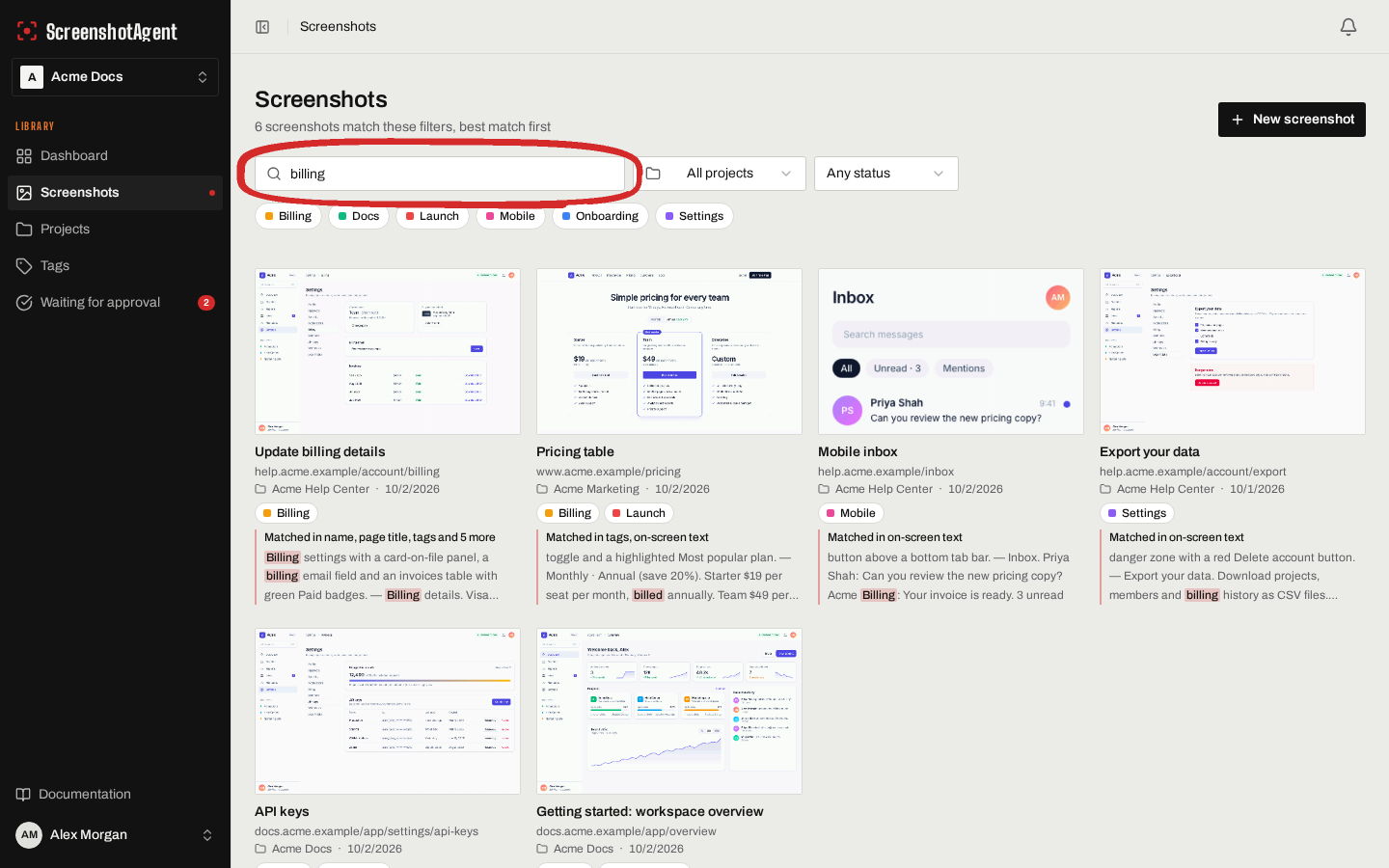
AI ready. Ask for any screenshot.
Connect Claude Code, Cursor, or any AI assistant that supports MCP. It searches what’s on each screenshot, like page titles, headings and on-screen text, then hands you the link or retakes it after you ship.
See how AI ready works> find the screenshot of our billing page
billing-settings.png
captured this morning
https://screenshotagent.com/s/…
> retake it after today’s deploy
Recapture queued for billing-settings.png
What you get
- AI annotations
Circles what matters
Circles, arrows, callouts and blur, drawn on top of every new capture. Your pixels never change.
- Discoveryacme.example/pricing/reports/reports/tour/settingslogin/settings/billinglogin
Finds your pages for you
Give us your web address. We find the pages worth showing.
- SchedulesNext: Fri 06:00Mon 06:00Tue 06:00Wed 06:00Thu 06:00approved
Retakes them on a schedule
Every day, week or month, or right after you ship.
- History
Keeps every old version
Look back at any screenshot, and check new ones before they go live.
- Every screen
Phones and dark mode too
The same page on desktop, tablet and phone, in light or dark.
- MCP serverFind the screenshot of our billing page.Here it is, taken this morning. Want me to retake it?
AI ready
Your AI assistant can find any screenshot by what is on it, grab its link, or retake it for you.
Never retake a screenshot again.
Connect your app today and let ScreenshotAgent keep every screenshot up to date.